
When people research data recovery, they often see companies mention a clean room, Class 100 environment, or laminar flow workstation. Those terms are not just marketing language when they are used correctly. In professional hard drive recovery, they matter because the inside of a hard drive is an extremely delicate mechanical environment. Once a drive must be opened, contamination control becomes a real technical issue, not a cosmetic one.
ACS Data Recovery uses a laminar flow clean work environment for procedures involving opened hard drives, head stack access, platter inspection, and related internal repairs. For many failed mechanical hard drives, this type of controlled workspace is an important part of safe handling. It helps reduce the risk of introducing airborne particles during inspection or component-level recovery work. If you are looking into professional data recovery services, understanding what a clean room actually does and when it matters can help you make a much more informed decision.
A clean room does not guarantee success, and it does not automatically mean every provider has the same technical ability. However, when a hard drive has a head crash, internal contamination, seized spindle, damaged heads, or other mechanical problems, proper environmental control is one of the basic requirements for doing the work responsibly. Opening a failed drive on a desk, in a shop back room, or in a general computer repair environment can make an already difficult case substantially worse.
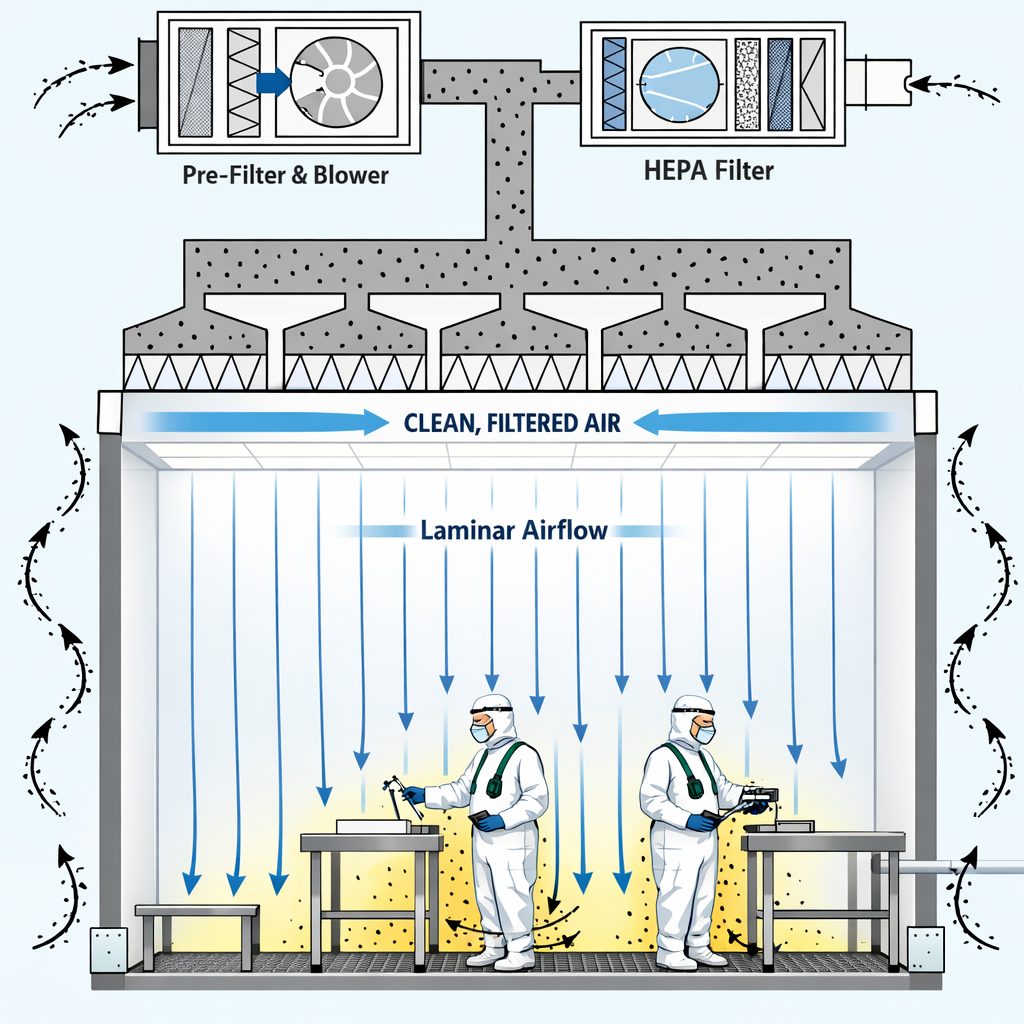
Why a Clean Room Matters in Hard Drive Recovery
A traditional hard disk drive is not built to be opened in ordinary room air. The read/write heads fly at a microscopic distance above the platter surface, and that tiny operating clearance is one reason even small contamination can become destructive. A single particle that seems insignificant to the eye can be large enough to interfere with normal head movement, scratch magnetic media, or contribute to additional instability after the drive is powered on.
This is why clean handling becomes so important whenever a case involves internal hard drive work. If the problem is purely logical, such as deleted files, damaged partitions, or file system corruption, a clean room may not be relevant at all. But when the issue is physical, the situation changes quickly. A drive that is clicking, not spinning correctly, scraping, or showing symptoms of head or media damage may require controlled inspection before any safe recovery attempt can move forward.
In those cases, a clean environment helps reduce one very specific risk: additional contamination during the recovery process. It does not undo platter damage. It does not repair severe scoring. It does not make damaged firmware disappear. What it does is create a better workspace for highly sensitive procedures that cannot reasonably be done in ordinary ambient air.
Examples of cases where a clean environment may be necessary
- Head crash cases where the read/write heads have contacted the platter surface
- Clicking hard drives with suspected head assembly failure
- Seized or stuck spindle situations
- Drives with internal contamination from a prior improper opening attempt
- Media inspection cases where platter condition must be evaluated
- Donor-part procedures involving compatible internal components
Many people first start asking about a clean room after hearing unusual noises from a drive. If that is your situation, pages such as why a hard drive clicks or head crash symptoms can help explain what may be happening mechanically before the recovery even begins.
What “Class 100” Actually Means
The phrase Class 100 clean room comes from an older but still widely recognized U.S. Federal Standard classification system that referred to the maximum allowable number of particles of a certain size in a cubic foot of air. In practical terms, when people in the data recovery field use the phrase, they are usually referring to a controlled work area appropriate for handling opened hard drives.
Modern clean room classifications are often discussed in relation to ISO standards, but the broader point remains the same: particle count matters. A normal room, office, warehouse, or repair bench contains far more airborne contamination than a properly filtered clean workspace. That difference becomes meaningful when you are exposing platters, heads, and other internal components that were designed to operate in a sealed environment.
It is also important to understand that there is often confusion online about the term itself. Some companies say “clean room” when they are actually referring to a laminar flow hood or a controlled bench workspace rather than an entire walk-in clean room. That does not automatically mean the setup is inadequate. In data recovery, a properly maintained laminar flow workstation can be entirely appropriate for many internal hard drive procedures. What matters is whether the environment is genuinely controlled and whether the technicians know how to perform the work correctly.
What a controlled clean workspace is designed to do
- Filter incoming air through high-efficiency filtration
- Create a directed airflow pattern that helps reduce airborne particle settlement
- Provide a cleaner environment for opening mechanically failed hard drives
- Minimize contamination introduced during inspection, part swaps, or internal stabilization work
- Support safer handling during delicate component-level procedures
That is why simply claiming to have a clean room is not enough. The purpose of the environment matters, the condition of the equipment matters, and the skill of the technician matters just as much.
Laminar Flow Technology and Why It Is Used
ACS Data Recovery uses laminar flow technology as part of its controlled work environment. Laminar flow refers to the way filtered air moves across the workspace in a consistent, directed pattern. The goal is to reduce turbulence and help keep airborne contaminants from settling into the area where open-drive work is being performed.
That matters because turbulence can allow particles to circulate unpredictably. In a controlled laminar setup, air is passed through high-efficiency filtration and directed across the work zone in a more uniform way. This creates a much better environment for accessing internal drive components than ordinary room air.
For the average customer, the practical takeaway is simple: if a hard drive must be opened, you want that work performed in a space designed specifically for that purpose. You do not want the cover removed at a desk, in a storefront computer shop, or by a general electronics hobbyist. Even a drive that might have been recoverable can become much more difficult after unnecessary exposure and mishandling.
Mechanical failure cases often involve more than one problem at the same time. A drive may have weak heads, unstable firmware behavior, degraded media, and prior contamination all at once. In those situations, disciplined clean handling is part of a larger recovery strategy. It is not a standalone solution, but it is one part of doing the work correctly.
Not Every Recovery Needs a Clean Room
One of the most common misunderstandings in this industry is the idea that every data recovery case must go into a clean room. That is simply not true. Many recoveries do not involve opening the drive at all. If the failure is logical, software-based, file-system related, or caused by accidental deletion, the work may be done through controlled imaging, logical reconstruction, or electronic diagnosis without ever exposing internal components.
This is why honest evaluation matters. A reputable lab should determine the nature of the failure before deciding what level of intervention is needed. Some common scenarios include:
Logical failure
Logical failures can include deleted files, corrupted file systems, damaged partition tables, or formatting issues. These cases often do not require internal drive work, assuming the hardware is still functioning well enough to be imaged safely.
Electronic or firmware-related failure
Some drives fail because of PCB problems, corrupted firmware modules, translator issues, or other electronic behavior. These cases may require advanced tools and expertise, but they do not always require opening the drive.
Mechanical failure
This is where a clean environment becomes much more relevant. A clicking drive, a seized motor, damaged heads, or suspected platter contact may require controlled internal work before the media can be imaged. In more severe cases, customers may be dealing with the kinds of conditions described on pages such as physical data recovery or hard drive read/write head failure.
Understanding this distinction helps customers ask better questions. Instead of just asking, “Do you have a clean room?” it is often more useful to ask, “Do you evaluate whether my case actually requires internal work, and if it does, how is that handled?”
The Risk of Opening a Hard Drive Outside a Controlled Environment
There is a reason experienced recovery labs warn against do-it-yourself internal hard drive work. Once a drive cover is removed, the platters and head assembly are exposed to the surrounding environment. In ordinary room air, that means dust, fibers, skin particles, and other contamination can settle where they do not belong.
For a severely failed drive, that can trigger a chain reaction. A platter that already has mild damage may suffer more contact. A head assembly that is already unstable may pick up contamination. A drive that might have yielded a partial recovery can become dramatically worse after one bad attempt. That is also why older myths such as the hard drive freezer trick are so risky. They encourage people to experiment on failing media when preservation should be the priority.
Common DIY mistakes that can make recovery harder
- Removing the drive lid in a normal home or office environment
- Touching platter surfaces or heads directly
- Attempting random PCB swaps without proper matching and adaptation
- Powering on a clicking or scraping drive repeatedly
- Using software tools on a mechanically unstable drive
- Continuing to run a device after unusual sounds first appear
Once media damage advances, there may be less readable surface remaining to work with. At that point, the conversation shifts from “Can the drive be repaired?” to “How much data can still be imaged before the drive degrades further?” That is one reason early handling decisions matter so much.
What Happens During Evaluation of a Mechanical Hard Drive Case
When a drive arrives for evaluation, the first step is not to open it automatically. A proper assessment usually starts with the symptoms, device model, prior history, whether the drive was dropped, whether it clicks, whether it spins, whether there have been previous attempts, and what type of data loss occurred. From there, diagnostic work can help determine whether the issue is logical, electronic, firmware-related, or mechanical.
If the evidence points to internal damage, the drive may then be examined in a controlled clean environment. The purpose of that inspection is to understand the internal condition as clearly as possible before proceeding. Depending on the case, the technician may be looking for:
- Signs of platter scoring or media abrasion
- Head alignment or parking issues
- Contamination from a prior opening attempt
- Stiction or seized spindle behavior
- Head stack damage or obstruction
- The likelihood that donor components may be required
Some cases are straightforward. Others are not. A drive may need donor parts, firmware adaptation, highly controlled imaging, multiple read passes, or selective extraction strategies to prioritize the most important data first. A clean room is simply one part of that broader technical workflow.
Why donor part work is not as simple as it sounds
Customers sometimes assume that if a drive has bad heads, the solution is just to install parts from another drive. In reality, donor compatibility can be complex. Model numbers, firmware families, microjogs, manufacturing variations, and internal revisions can all matter. Even with the right donor, success depends on the condition of the original platters and the stability of the drive after the procedure. That is why mechanical data recovery is usually much more specialized than general computer repair.
Clean Room Claims vs. Real Recovery Capability
A company can mention a clean room on its website and still lack the practical experience needed for difficult recoveries. On the other hand, a technically strong lab may use a properly maintained laminar flow workstation rather than a large theatrical walk-in room. The point is that the presence of clean equipment alone does not tell the whole story.
When evaluating a provider, customers should think beyond the phrase itself and consider whether the lab appears to understand the full recovery process. Important questions include:
- Do they explain the difference between logical and physical failure?
- Do they discuss imaging rather than simply “repairing” the drive?
- Do they warn against repeated power-on attempts?
- Do they appear familiar with head crashes, platter damage, and donor selection issues?
- Do they provide realistic expectations instead of guarantees?
That matters because the objective in a professional recovery is usually not to restore the original drive for continued use. The goal is to stabilize the device long enough to extract the data. That often requires a combination of controlled environment work, specialized hardware, firmware access, and careful imaging methodology.
Frequently Asked Questions About Clean Rooms and Hard Drive Recovery
Does every failed hard drive need to be opened in a clean room?
No. Many data recovery cases do not require internal drive work at all. Logical failures, deleted files, partition problems, and some firmware-related issues may be handled without opening the drive. A clean room or laminar flow environment becomes relevant mainly when the drive has a mechanical problem that requires access to internal components.
If a company says it has a clean room, does that mean it can recover my data?
Not by itself. A controlled environment is important for certain procedures, but it does not guarantee successful recovery. Recovery outcomes depend on the type of failure, the condition of the media, whether the drive has been previously opened or repeatedly powered on, and the technical ability of the lab performing the work.
What is the difference between a clean room and a laminar flow hood?
A full clean room is an entire controlled environment, while a laminar flow hood or workstation creates a highly filtered clean work area at the bench level. In hard drive recovery, a properly maintained laminar flow system can be very suitable for many internal procedures. The important factor is whether the workspace is truly appropriate for opened-drive handling.
Can opening a hard drive at home ruin the recovery?
It can. Opening a drive in a normal home or office environment exposes the internals to contamination that can worsen damage, especially if the heads or platter surfaces are already compromised. Even a single improper attempt can reduce the amount of recoverable data. If the information is important, it is much safer to avoid opening the drive yourself.
What signs suggest a drive may need clean room work?
Common warning signs include clicking, scraping, repeated spin-up/spin-down behavior, a drive that suffered a drop or impact, or cases where the drive appears seized or mechanically stuck. These symptoms do not prove that internal work will be needed, but they often indicate a possible physical failure that should be evaluated carefully.
Is a clean room about keeping the drive sterile?
No. In data recovery, the goal is not sterility in the medical sense. The goal is contamination control. Hard drives are sensitive to airborne particles, so the environment must reduce dust and other contaminants during internal procedures. It is about protecting the media from additional exposure while recovery work is performed.
Why do recovery companies talk about particle counts and classifications?
Because the acceptable amount of airborne contamination in a controlled workspace is vastly lower than in ordinary room air. Those classifications help describe the cleanliness of the environment and explain why opened hard drive work should not be performed casually on a standard bench or tabletop.
Should I keep powering on a clicking drive to test it?
Usually, no. Repeated power-on attempts can make a bad situation worse, especially if the heads are damaged or contacting the platter surface. If the drive contains important data, the safer approach is to stop using it and have it evaluated before more damage occurs.
Final Thoughts on Clean Rooms in Data Recovery
A clean room is not a buzzword when it is tied to real mechanical hard drive recovery work. It exists for a reason. Open-drive procedures require a controlled environment because the internal tolerances of a hard disk are extremely small, and contamination can create additional risk. For physically failed drives, that environment can be an important part of responsible handling.
At the same time, a clean room should be understood in context. It is one piece of a professional recovery process that may also involve diagnostics, donor-part strategy, firmware access, controlled imaging, and file reconstruction. The best recovery decisions start with understanding the actual failure type rather than assuming every case is the same.
If your hard drive is clicking, has suffered impact damage, has already been opened, or may have internal mechanical failure, acting carefully is often more important than acting quickly. Avoid DIY experimentation, avoid unnecessary power-on attempts, and make sure the device is evaluated by a provider that understands both the environmental requirements and the technical realities of serious hard drive recovery.


